Friday, February 28

Difference between .out and .log files

.out will print all logs related to your java application deployed whereas .log file will print all logs related to weblogic server like startup.stop,deployment etc....

.out will have standard shell output where the instance was started and it will have mostly Notice and above log level will be written on it. .log will have the server logs along with all sub system logs too.

Java application will write logs on .out only if the app code redirects .logs to standard output, there are many logging mechanism are available like loc4j which can be used to write the java application logs to different/ separate files.

  • Afzal Haque .out will print all logs related to your java application deployed whereas .log file will print all logs related to weblogic server like startup.stop,deployment etc....
  • Maheshkumar Subbaiyan .out will have standard shell output where the instance was started and it will have mostly Notice and above log level will be written on it.
    .log will have the server logs along with all sub system logs too.

    Java application will write logs on .out only if the app code redirects .logs to standard output, there are many logging mechanism are available like loc4j which can be used to write the java application logs to different/separate files.

Reasons for admin server down


Admin Server can be down for many reason like,

 memory issue,

disk space,

bad config changes on the back-end,

ip not configured properly,

bad start up arguments .. etc..

Multicast - Unicast

Unicast is the best option in real time scenario..Bcz Here is the examples..
In your cluster if u are having 10 Mange server instances then,

Multicast: Each MS is talking to other 9 MS So that total 90 connection was established. 
Which is burden on the server in the peak business hours. Bcz of which weblogic performance will may go down.

Unicast: 1st MS will brought up and it will act as a leader..So remaining 9 MS talking to that leader only so only 10 connections will established. So that weblogic performance may not go down.

If there is an issue with MS1 then it will be removed from the cluster and the requests will 
be processed by other managed servers in the cluster.So this is not an issue..
Multicast requires network config and support from network team to do it, but unicast doesn't require any additional setup on network or from the network team. Oracle recommends to use Unicast.

XA and NON-XA

Xa resource is used where there is a distributed transaction is required.
==============================================
According to my knowledge XA drivers are used for globule transaction..and non XA drivers are used for local transaction..
========================================================================

XA : its basically when you have to use a two-phase commit , An XA transaction, in the most general terms, is a "global transaction" that may span multiple resources.

So this would mean for eg if there are two DB which needs to be commited at the same 
time .. so in this case you would use an XA drivers

connection Pool : 

The reason for using connection pool is ...Opening and maintaining a database connection 
for each user, especially requests made to a dynamic database-driven website application, 
is costly and wastes resources. So to avoid this the connection pool uses a cache of 
database connections maintained so that the connections can be reused when future 
requests to the database are required.

=====================================================================

XA:

An XA transaction, in the most general terms, is a "global transaction" that may span multiple resources. An XA transaction involves a coordinating transaction manager, with one or more databases (or other resources, like JMS) all involved in a single global transaction. 

XA transactions come from the X/Open group specification on distributed, global transactions. JTA includes the X/Open XA spec, in modified form. 

XA gets involved when you want to work with multiple resources - 2 or more databases, a database and a JMS connection, all of those plus maybe a JCA resource - all in a single transaction. In this scenario, you'll have an app server like Websphere or Weblogic or JBoss acting as the Transaction Manager, and your various resources (Oracle, Sybase, IBM MQ JMS, SAP, whatever) acting as transaction resources. Your code can then update/delete/publish/whatever across the many resources. When you say "commit", the results are commited across all of the resources. When you say "rollback", _everything_ is rolled back across all resources. 

The Transaction Manager coordinates all of this through a protocol called Two Phase Commit (2PC). This protocol also has to be supported by the individual resources. 

In terms of datasources, an XA datasource is a data source that can participate in an XA global transaction. 

NON-XA:

A non-XA transaction always involves just one resource.
Non-XA transactions have no transaction coordinator, and a single resource is doing all its transaction work itself (this is sometimes called local transactions).  

Most stuff in the world is non-XA - a Servlet or EJB or plain old JDBC in a Java application talking to a single database.


A non-XA datasource generally can't participate in a global transaction (sort of - some people implement what's called a "last participant" optimization that can let you do this for exactly one non-XA item).

============================================

An XA transaction, in the most general terms, is a "global transaction" that may span multiple resources. A non-XA transaction always involves just one resource. 

An XA transaction involves a coordinating transaction manager, with one or more databases (or other resources, like JMS) all involved in a single global transaction. Non-XA transactions have no transaction coordinator, and a single resource is doing all its transaction work itself (this is sometimes called local transactions).

Most of the time we use non-XA - a Servlet or EJB or plain old JDBC in a Java application talking to a single database. XA gets involved when you want to work with multiple resources - 2 or more databases, a database and a JMS connection, all of those plus maybe a JCA resource - all in a single transaction. Here, Weblogic will be acting as the Transaction Manager, and your various resources (Oracle, Sybase, IBM MQ JMS, SAP, whatever) acting as transaction resources. Your code can then update/delete/publish/whatever across the many resources. When you say "commit", the results are commited across all of the resources. When you say "rollback", _everything_ is rolled back across all resources.

The Transaction Manager coordinates all of this through a protocol called Two Phase Commit (2PC). This protocol also has to be supported by the individual resources.

In terms of datasources, an XA datasource is a data source that can participate in an XA global transaction. A non-XA datasource generally can't participate in a global transaction (sort of - some people implement what's called a "last participant" optimization that can let you do this for exactly one non-XA item).

Heartbeat Msg communication

  •  WebLogic Server instances in a cluster communicate with one another using two basic network technologies:
  • IP sockets, which are the conduits for peer-to-peer communication between clustered server instances.
  • IP unicast or multicast, which server instances use to broadcast availability of services and heartbeats that indicate continued availability.

  • Multicast : Each server communicates with every member server in the cluster. Which means heartbeats are sent to every server. A multicast address and multicast port is used for listening to the messages.

  • Unicast : For the member servers in the cluster, group leaders are chosen and only those group leaders communicate with the servers among the group and these leaders notify each other about the availability of all the other servers.A network channel is used for communication between the servers. If no channel is specified, default network channel is used.

  • ===============================================================================

  • Each server communicates with every member server in a cluster that means heart beat messages sent to every server.
  • For multicast u can see heart messages internally cmd is java utiles.MulticastTest -n -a -p (i.e multicast name,adress,port num)
  • unicast means servers are in a cluster, group leaders are chosen those group leaders will comm the servers among the group
  •  

Wednesday, February 19

Samurai Analisis


first open the samurai tool . drag n drop the thread dump in samurai.. it will automatically displays the table format .. so that we can analyse each object status.. like runnable, waiting, blocked , deadlock etc..

NEW: The thread is created but has not been processed yet.

RUNNABLE: The thread is occupying the CPU and processing a task. (It may be in WAITING status due to the OS's resource distribution.)

BLOCKED: The thread is waiting for a different thread to release its lock in order to get the monitor lock.

WAITING: The thread is waiting by using a wait, join or park method.


TIMED_WAITING: The thread is waiting by using a sleep, wait, join or park method. (The difference from WAITING is that the maximum waiting time is specified by the method parameter, and WAITING can be relieved by time as well as external changes.)


http://allthingsmdw.blogspot.in/2012/02/analyzing-thread-dumps-in-middleware_9856.html

Node Manager


Node Manager in Oracle Weblogic Server


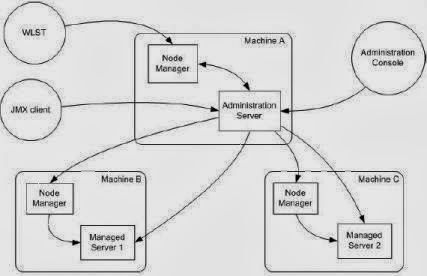
Node Manageris Weblogic Server utility to start, stop and restart Admin and Managed Server Instances from remote location.
1. Node Manager Process is associated with a Machine and NOT with specific Weblogic Domain (i.e. Use one node manager for multiple domains on same machine)
2. There are two versions of Node Manager - Java-based and Script-based
Java-based node manager - runs with in JVM (Java Virtual Machine) Process and more secure than script-based node manager. Configuration for java-based node manager are stored in nodemanager.properties
Script-based node manager - is available for Linux and Unix systems only and is based on shell script.
3. There are multiple ways to access Node Manager
- From Administration Console : Environments -> Machines -> Configuration -> Node Manager
- JMX utilities (Java Management eXtension) 
- WLST commands (WebLogic Scripting Tool)
4.Default port on which node manager listen for requests is localhost:5556, When you configure Node Manager to accept commands from remote systems, you must uninstall the default Node Manager service, then reinstall it to listen on a non-localhost (IP’s other than 127.0.0.1) listen address.
5. Any domain created before creation of Node Manager Service will not be accessible via node Manager(even after restarting node manager), solution is to run the WLST command “nmEnroll” to enroll that domain with the Node Manager.
6. Any domains created after the Node Manager service has been installed should not have to be enrolled against the Node Manager. The Node Manager should automatically be ‘reachable‘ by the domain.

How to Configure Node Manager ?
1.Configure each computer (on which you wish to use Node Manager) as a Machine in WebLogic Server
Environments -> Machines -> New (Add Machine)
Environments -> Machines -> Machine Name (created above) -> Configuration -> Node Manager

2. Assign each server instance to Machine.
Environments -> Machines -> Machine Name (created above) -> Configuration -> Servers -> Add (Add Server running on this node which you would like to monitor using Node Manager)

3. Enroll domain (created before installation of Node Manager) to Node Manager
Unix /Linux
cd $BEA_HOME/user_projects/domains//bin/
setDomainEnv.sh
java weblogic.WLST
wls> connect(’weblogic’,'weblogic’, ‘t3://mymachine.mydomain:7001′)
wls> nmEnroll(’$BEA_HOME/user_projects/domains/’, ‘$BEA_HOME/wlserver_/common/nodemanager’)
where “mymachine.mydomain:7001″ is the reference to the Admin Server of the domain to which the server and machine definition belongs

How to start Node Manager ?
$WL_HOME\server\bin\startNodeManager.sh (startNodeManager.cmd on Windows)

Important Configuration files
– $WL_HOME/common/nodemanager/ nodemanager.properties, nodemanager.domains, nm_data.properties
–$DOMAIN_HOME/config/nodemanager/nm_password.properties

–$DOMAIN_HOME/servers//data/nodemanager/ boot.properties, startup.properties, server_name.addr, server_name.lck, server_name.pid, server_name.state

Node Manager Log Files
$WL_HOME/common/nodemanager/nodemanager.log